Latest LaunchBox Versions Supported on Older Windows Versions
Written By launchbox
Last updated 4 months ago
Some older versions of Windows can no longer run the latest LaunchBox releases. This is due to a combination of Microsoft ending support for older operating systems and modern third-party dependencies moving away from those platforms.
This article explains what the Windows Requirements Check means, which LaunchBox versions are recommended for older Windows versions, and how to request an older installer if needed.
Important: Current LaunchBox versions support Windows 10 and Windows 11 only. Windows 7, Windows 8, and Windows 8.1 are not supported by the latest LaunchBox releases.
What the Windows Requirements Check Means
Newer LaunchBox installers perform a Windows Requirements Check before installation continues. This check confirms that the computer meets the minimum requirements needed by current LaunchBox builds.
Current LaunchBox versions require:
Windows 10 or newer
A 64-bit version of Windows
If the check fails, you may see this message:
Windows Requirements Check failed verification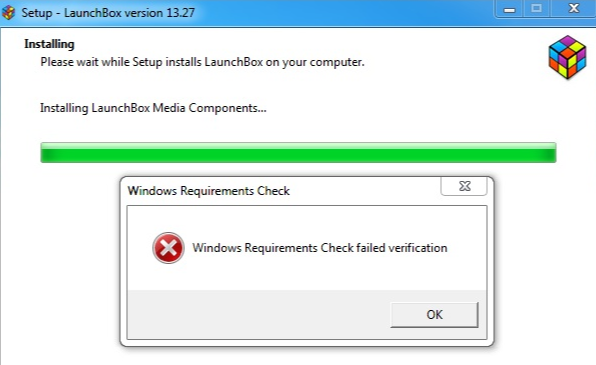
This usually means the installed version of Windows is too old for the LaunchBox version being installed, or that the system is not running a 64-bit version of Windows.
Why an Older Installer May Still Fail
The Windows Requirements Check is only one layer of compatibility. Some older LaunchBox versions do not include that check, but can still fail on older operating systems due to bundled dependencies.
For example, LaunchBox 13.20 does not include the newer Windows 10+ requirements check, but it still includes a newer CefSharp/Chromium dependency that may not run correctly on Windows 7.
CefSharp/Chromium is the embedded browser technology LaunchBox has used for in-app web content, such as storefront sign-ins, web views, and some Big Box theme browser views.
That can cause startup errors such as:
Theme: NOT SETCefSharp.Core.Runtime.dll could not be loadedA procedure imported by CefSharp.Core.Runtime could not be loaded
Because of this, the latest installer that bypasses the Windows Requirements Check is not always the latest version that will actually run correctly on older versions of Windows.
Latest Recommended LaunchBox Version by Windows Version
Important Version Notes
LaunchBox 13.21 and newer require Windows 10 or newer and may show the Windows Requirements Check failure on older systems.
LaunchBox 13.20 was the last version before the newer Windows Requirements Check, but it may still fail on Windows 7, Windows 8, and Windows 8.1 because of newer Chromium/CefSharp dependencies.
LaunchBox 13.12 updated CefSharp/Chromium to version 119.4.30.0, which is not a good fit for Windows 7-era systems.
For Windows 7, Windows 8, and Windows 8.1, LaunchBox 13.11 is the safest recommended version.
Why Older Windows Versions Are No Longer Supported
We no longer support Windows 7, Windows 8, or Windows 8.1 with current LaunchBox releases because Microsoft has ended support for those operating systems, and many modern dependencies that LaunchBox relies on no longer support them either.
Continuing to support those operating systems would prevent us from keeping LaunchBox updated, secure, and compatible with current tools and libraries.
How to Request an Older Installer
If you need an older LaunchBox installer for one of these operating systems, please email:
support@unbrokensoftware.com
Include the Windows version you are using and request the appropriate older LaunchBox installer. For example, if you are using Windows 7, Windows 8, or Windows 8.1, request LaunchBox 13.11.
Was this helpful?
Still need help? Ask the team